This blog post was co-authored with AI (Anthropic Claude Fable).
Domain-driven design works best when the people who know the domain can check the model. Most modelling notations get in the way of that.
Fact-based modelling helps. Instead of starting from tables or classes, you describe the domain as short sentences that a domain expert can confirm or reject. This post walks through that way of working, then translates the result into LinkML, a schema language with good code generation.
Think in facts
The best-known fact-based method is Object-Role Modeling (ORM). Its core idea: a domain is a set of facts, and every fact can be read out as a sentence.
Each Team has at least one lead, who is a Person.
A product manager can read that sentence. A DBA can read it. The person who runs the team can read it and tell you it’s wrong. “Teams go without a lead for months during reorgs” is cheap feedback at a whiteboard and expensive feedback after you ship a NOT NULL constraint.
You find these facts by talking with domain experts, using concrete examples (“take the platform team. Who’s the lead there?”), plain language, and simple drawings. Examples do double duty: they help you discover a fact, and they test it. If the expert can’t fill in your example table, the fact is wrong.
Read Halpin & Morgan Information Modeling and Relational Databases for details.
Sketch first, formalize later
Keep formal notation off the whiteboard. Circles and lines and sticky notes are enough: a circle per kind of thing, a line per fact, the sentence written along the line, examples on stickies underneath. ORM has a precise diagram notation, and in a workshop that precision turns contributors into spectators: the expert who happily corrects a sentence will hesitate to touch a diagram symbol.
For many domains, a whiteboard photo plus the agreed sentences is the whole model, and stopping there is fine. See Caseum for more about such a lightweight approach.
From facts to schema
Sometimes you can’t stop there. You need a JSON Schema for an API, a database schema, docs that stay current. Maintaining those by hand, in parallel, is how the drift starts. Better to keep one source file and generate the rest.
ORM tooling is not in the best state. LinkML is a great alternative. It is a YAML-based schema language with generators for JSON Schema, SQL, ER diagrams, documentation sites, and typed Pydantic and TypeScript classes.
A small HR domain as fact sentences:
Each Person is identified by an id, which is a URI.
Each Person has exactly one name.
Each Person (the coachee) may have one or more coaches, each of whom is a Person.
Each Person has at most one Department.
Each Team has at least one lead, who is a Person.
The same model as LinkML (hr.yaml):
id: https://example.org/hr
name: hr
prefixes:
  linkml: https://w3id.org/linkml/
  hr: https://example.org/hr/
default_prefix: hr
default_range: string
imports:
  - linkml:types

classes:
  Person:
    attributes:
      id:
        identifier: true
        range: uri
      name:
        required: true
      coach:
        range: Person
        multivalued: true
      department:
        range: Department
  Department:
    attributes:
      id:
        identifier: true
        range: uri
  Team:
    attributes:
      lead:
        required: true
        multivalued: true
        range: Person
Each fact becomes a slot (LinkML’s word for an attribute), and the how-many wording maps directly:
| Fact sentence form | LinkML slot |
|---|---|
is identified by | identifier: true |
has exactly one | required: true |
has at most one | (the default: optional, single-valued) |
has at least one | required: true + multivalued: true |
may have one or more | multivalued: true |
who/which is a X | range: X |
Settle on a fixed set of phrases like this and turning the whiteboard into a schema stops being design work and becomes transcription, which AI can do for you.
From schema to software
Use the LinkML tools to create other files from the model. For example:
JSON Schema
Run gen-json-schema hr.yaml:
"Person": {
    "additionalProperties": false,
    "properties": {
        "coach": {
            "items": { "format": "uri", "type": "string" },
            "type": [ "array", "null" ]
        },
        "department": { "format": "uri", "type": [ "string", "null" ] },
        "id": { "format": "uri", "type": "string" },
        "name": { "type": "string" }
    },
    "required": [ "id", "name" ]
}
Mermaid ER diagram
Run gen-erdiagram hr.yaml:
erDiagram
Department {
    uri id
}
Person {
    uri id
    string name
}
Team {
}

Person ||--|o Department : "department"
Person ||--}o Person : "coach"
Team ||--}| Person : "lead"
which Mermaid renders as:
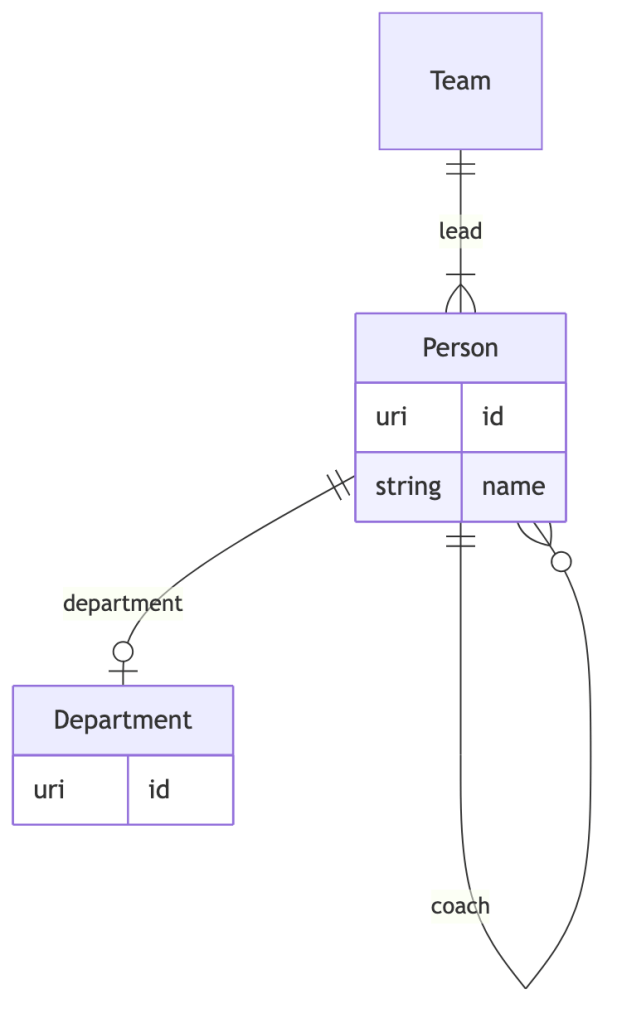
(Mermaid is supported by many Markdown tools, including on GitHub)
SQL
Run gen-sqlddl hr.yaml:
CREATE TABLE "Person" (
    id TEXT NOT NULL,
    name TEXT NOT NULL,
    department TEXT,
    PRIMARY KEY (id),
    FOREIGN KEY(department) REFERENCES "Department" (id)
);

CREATE TABLE "Person_coach" (
    "Person_id" TEXT,
    coach_id TEXT,
    PRIMARY KEY ("Person_id", coach_id),
    FOREIGN KEY("Person_id") REFERENCES "Person" (id),
    FOREIGN KEY(coach_id) REFERENCES "Person" (id)
);
Testing the schema with examples
Given ada.yaml:
id: https://example.org/people/ada
name: Ada
coach:
  - https://example.org/people/grace
and bob.yaml:
id: https://example.org/people/bob
department: engineering
Here’s what testing looks like:
$ linkml validate -s hr.yaml -C Person ada.yaml
No issues found
$ linkml validate -s hr.yaml -C Person bob.yaml
[ERROR] [bob.yaml/0] 'engineering' is not a 'uri' in /department
[ERROR] [bob.yaml/0] 'name' is a required property in /
There is more to LinkML, but the shape is clear: one schema file, kept under code review, with tool automation so that artifacts do not drift from each other.
Remember the facts
Compare the written fact
Each Person (the coachee) may have one or more coaches, each of whom is a Person.
with the LinkML model slot:
coach:
  range: Person
  multivalued: true
The sentence names both roles, coach and coachee, and reads aloud in either direction. The slot names one direction and buries the rest in structure. A domain expert can verify the sentence but not the YAML.
Keep the written facts and their examples around, right next to the schema. Your AI is excellent at English and so can help keep facts and LinkML in sync.

